
A filer is someone whose name appears on the Federal Board of Revenue’s Active Taxpayers List (ATL). Filers pay much lower withholding tax on bank profit, National Savings, T-bills, property and vehicles. This guide shows how to become a filer in Pakistan, step by step.
Last updated: 29 October 2026 by Ahmed.
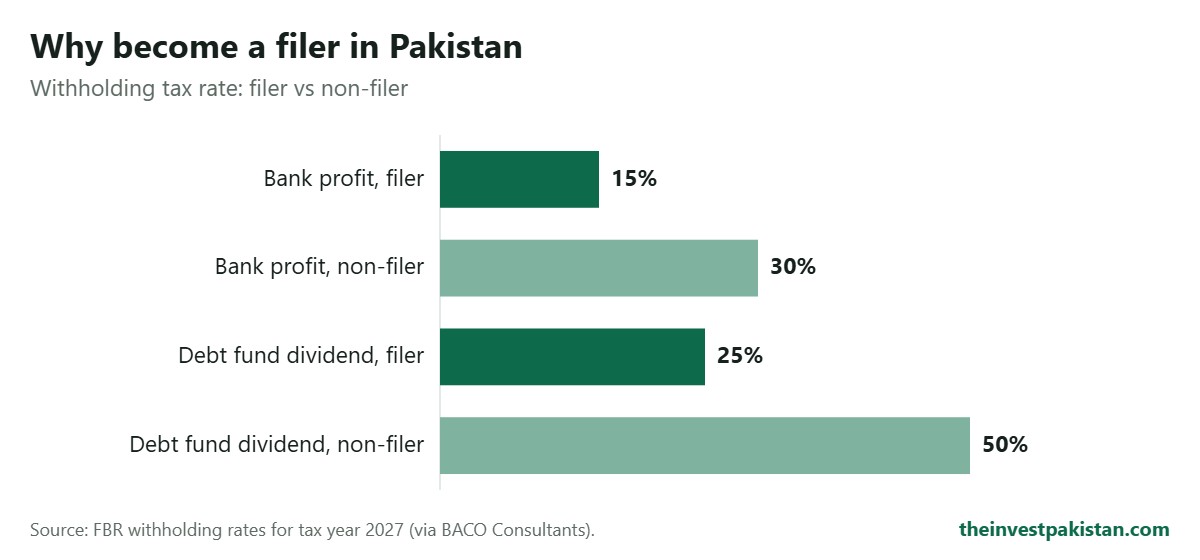
Why Becoming a Filer Matters
| Transaction | Filer | Non-filer |
|---|---|---|
| Profit on bank deposits (individuals) | 20% | 40% |
| Profit on T-bills and PIBs (individuals) | 15% | 30% |
| National Savings profit (most schemes) | 15% | 30% |
| Prize bond winnings | 15% | 30% |
On Rs 10 lakh in a Regular Income Certificate, a filer keeps about Rs 1,500 more every month than a non-filer.
What You Need
- Your original CNIC (front and back scan)
- A mobile number registered in your name, and an email address
- Your income details: salary certificate, business details or other income
- Your bank account details (IBAN)
- Details of your assets and liabilities as of 30 June
Step-by-Step: How to Become a Filer in Pakistan
- Register on IRIS. Go to iris.fbr.gov.pk and choose “Registration for Unregistered Person”.
- Enter your details: CNIC, mobile number and email.
- Verify the codes sent to your mobile and email.
- Get your NTN. For individuals, your CNIC number becomes your National Tax Number. Registration is free.
- Complete your profile (Form 181) after logging in.
- File your income tax return for the latest tax year (Form 114 for individuals), declaring all income.
- File your wealth statement, listing assets and liabilities as of 30 June.
- Pay any tax due by generating a PSID and paying through your bank, internet banking or the Tax Asaan app.
- Check your ATL status once FBR processes your return.
How to Check Your ATL Status After You Become a Filer in Pakistan
Send your 13-digit CNIC number (without dashes) by SMS to 9966, or search on the FBR website’s Active Taxpayers List page. FBR updates the ATL regularly, so your name may take some time to appear after filing.
Deadlines and Late Filing
The deadline for individuals to file their Tax Year 2026 return was 30 September 2026. You can still file after the deadline, but late filers face penalties, and to appear on the ATL a late filer must pay an ATL surcharge. Reports differ on the current surcharge amount, so check it on IRIS before paying.
Need Help?
The Invest Pakistan offers help with NTN registration, return filing and ATL status. Contact us for guidance.
Common Mistakes to Avoid
- Registering for an NTN but never filing a return. You only join the ATL after you file.
- Filing late. You can still file, but you pay a surcharge to get onto the list during the year.
- Using an agent who asks for your IRIS password. Keep your login private.
- Forgetting to declare bank profit, National Savings and other income already taxed at source.
Free tool: check how much income tax is deducted from your salary with our salary income tax calculator.
Frequently Asked Questions
Is NTN registration free?
Yes. Registering on IRIS and getting an NTN costs nothing.
Can a student or housewife become a filer?
Yes. Anyone with a CNIC can register and file a return, even with little or no taxable income. Filing still lowers the tax deducted on bank profit and savings.
Can overseas Pakistanis become filers?
Yes. Overseas Pakistanis can register on IRIS with their CNIC or NICOP and file returns online.
How long does it take to appear on the ATL?
After FBR processes your return, your name appears in the next ATL update. Late filers must also pay the ATL surcharge.
This guide is for general information only and is not financial or tax advice. Rates change often, so confirm the latest figures with the official source before you invest.
Related Guides
- Filer vs Non-Filer Tax Calculator 2026-27
- How to check ATL status (SMS 9966)
- Regular Income Certificate: monthly profit after tax
- National Savings Certificates: latest rates and tax
- T-Bills: profit after tax for filers and non-filers
- Best investments for monthly income in Pakistan
- ATL surcharge 2026: Rs 25,000 for late filers